Importing your own catalogs¶
acid import turns a pile of tabular files — FITS, CSV/TSV, parquet,
or Arrow — into a HATS catalog you can crossmatch, filter, and query
like any other. It reads your files, partitions the rows by sky
position, writes a HATS-valid directory, and (by default) builds a
margin cache so boundary-crossing crossmatches are correct.
You name the source kind as the first word — the file format
(acid import parquet, acid import csv, acid import fits,
acid import arrow) or a Rubin Butler dataset (acid import butler).
acid import peek inspects an input without importing it. Naming the
format keeps each format's options under its own verb (CSV's
--delimiter lives under acid import csv, not in one giant flag list),
and lets you import a file whose extension doesn't say its type
(a pipe-delimited survey.dat read as acid import csv survey.dat).
Use it whenever your data isn't already a HATS catalog: a survey
table you downloaded as FITS, a CSV of targets a collaborator emailed
you, a parquet export from a database, or a Rubin Butler dataset. The
files can be on local disk or a remote store — an http(s):// URL
or an s3:// / gs:// / az:// bucket — read straight from the source
(see Importing from a URL or object store).
The same command scales from a laptop to a cluster. A file that fits in
memory is imported in one pass; a billion-row pile too big for RAM is
shuffled out of core through an in-memory exchange — you don't choose,
acid picks the path from the input size (and always tells you which
one it ran). The flags are identical either way.
An import either completes or fails loudly — it never produces a
half-written catalog, and the only rows it ever drops are those with
null/NaN coordinates, which it reports by count as it goes (see
Did the import work?). Astronomers fear silently
missing rows; acid import is built so you never do.
The full flag set with defaults is in the CLI reference; this page is the task-shaped overview.
Which columns are your coordinates?¶
Before the first import you need to know two things about your file:
which column is RA and which is Dec (acid never guesses
them). If you didn't write the file yourself, peek at it:
Format:  fits
File:    tractor-1126p222.fits
Rows:    7,042
Columns: 207
Bytes/row: ~1.2 KiB  (1,232 B)

  column         type         bytes  unit
  -------------  -----------  -----  ----
  release        int16            2
  brickid        int32            4
  objid          int32            4
  type           str             16
  ra             float64          8  deg
  dec            float64          8  deg
  dchisq         float32[5]      20             [array]
  ebv            float32          4  mag
  ...

Coordinates: looks like --ra ra --dec dec
Note:    all 2 files must share these columns (order may differ).
acid import peek reads only the file's metadata (a parquet footer, a
FITS header, or a small CSV sample) — it never loads the whole file and
writes nothing. It auto-detects the format, then prints it, the row
count, every column with its type, per-row byte size, and unit, flags
any per-row array
columns (see Working with real survey FITS),
and guesses the
RA/Dec columns by name so you can copy them straight into the real
command. The bytes column and the Bytes/row total are the in-memory
size of one row — exact where it's cheap to know (FITS column formats, the
parquet footer's per-column sizes) and a sampled/typical estimate
otherwise, so multiplying by your row count gives a quick footprint to
size --workers / --ram-budget against. An [array] column carries its
real per-row size (e.g. dchisq above is 20 B = 5 × 4), not a flat guess. peek takes no --out / --ra / --dec. It works on a
remote source too — acid import peek s3://bucket/cat/file.parquet
(with --storage-option for credentials) reads just the footer, not the
whole object (see
Importing from a URL or object store).
When more than one column looks like a coordinate (e.g. ra, raj2000,
ra_icrs), peek suggests the plainest name and lists the rest so
you can choose deliberately:
If it finds nothing coordinate-like, it says so and you pass --ra/--dec
by hand.
Import in one command¶
Name the format, point it at your file, name the output, and tell it the coordinate columns:
That writes a HATS catalog named legacy_dr10. Because --out is a
bare name (no slash), it lands in your catalog library — under the
first writable ACID_PATH root — so you can re-open it
by that name from anywhere:
To put the catalog somewhere specific, give --out a path
(anything with a /), used verbatim:
That's the whole happy path. The same command works unchanged whether the input is one 17 MB brick or ten thousand of them totalling a terabyte — see A pile of files and Tuning for scale.
A worked example¶
The DESI Legacy Survey publishes its catalogs as per-brick FITS Tractor tables — a realistic, freely downloadable example. Grab one brick and import it:
# One ~17 MB Tractor brick from Legacy Survey DR10 (south).
curl -O https://portal.nersc.gov/cfs/cosmo/data/legacysurvey/dr10/south/tractor/112/tractor-1126p222.fits

acid import fits tractor-1126p222.fits --out legacy_dr10 --ra ra --dec dec
Then open it and pull a few rows as an astropy table (units and all):
import acid

cat = acid.open("legacy_dr10")
print(cat.select("ra, dec, type, dchisq").head(5).to_astropy())
The catalog is now a first-class HATS table: crossmatch it against
Gaia, filter by type, aggregate — everything in the rest of the
user guide applies.
A pile of files¶
A real survey arrives as many files, not one. Point the format verb at a directory and it imports every data file inside:
or at a quoted glob — quote it so acid expands the pattern itself
instead of the shell, which matters when the directory holds tens of
thousands of files (shell expansion would overflow the argument list):
acid import fits '/data/legacy/dr10/tractor/**/tractor-*.fits' --out legacy_dr10 \
    --ra ra --dec dec
Every input is read as the format you named and must share the same columns (column order may differ between files). That's the normal shape of a survey data release, so it usually just works; if a file is the odd one out, the import fails loudly naming it rather than silently dropping its rows.
To see exactly which files a directory or glob matched before you
commit — handy for a fat glob or a remote listing — use acid import peek
--list. It prints the full list (one per line — local paths relative to
your working directory, remote URLs verbatim), so it pipes cleanly into
the usual tools:
acid import peek '/data/legacy/dr10/tractor/**/tractor-*.fits' --list | wc -l
acid import peek '/data/legacy/dr10/tractor/**/tractor-*.fits' --list | head
(Plain acid import peek also shows the first 10 matched files alongside
the schema, and points you at --list when there are more.)
Other input formats¶
CSV and TSV¶
CSV imports under acid import csv, but acid recommends a
--schema so the column types are pinned rather than inferred (CSV
type inference can diverge between files — one chunk looks integer, the
next has a decimal). The schema is a small YAML file mapping column names
to types:
Three CSV-specific knobs (under acid import csv) cover the usual
real-world variations:
--no-header— the file has no header row. Name the columns with a positional schema (name: {at: <1-based column index>, type: …}), listing only the columns you want.--comment-char '#'— skip metadata/comment lines that start with a character (common in survey ASCII dumps and ECSV files).--delimiter '|'— the field separator, when it isn't a comma (.csv) or tab (.tsv). Pipe- and semicolon-delimited catalogs are common, and naming the format lets the file be called anything (.tbl,.dat, no extension at all):
acid import csv psc.tbl --out two_mass_psc --ra ra --dec dec \
    --delimiter '|' --comment-char '\' --schema psc.schema.yaml
Gzipped CSV/TSV (.csv.gz, .tsv.gz) is read transparently — no need
to decompress first:
acid import csv GaiaSource_000000-003111.csv.gz --out gaia_chunk \
    --ra ra --dec dec --comment-char '#' --schema gaia.schema.yaml
Rubin Butler¶
To import directly from a Rubin Butler repository instead of files, use
acid import butler with the repo, collection, and dataset type. No LSST
stack required — acid reads the Butler itself by default (set
ACID_BUTLER_IMPL=stack to use the real lsst.daf.butler instead):
acid import butler --repo /repo/main \
    --collection LSSTComCam/runs/DRP/DP1 \
    --dataset object \
    --out dp1_object --ra coord_ra --dec coord_dec \
    --where "band='r'"
Butler input always uses the out-of-core shuffle. --where narrows
which datasets are pulled.
Remote Butlers (Rubin DP1) — no stack, just a token¶
A repo named by an alias (--repo dp1) or pointing at a Butler web
service — like Rubin DP1 on data.lsst.cloud — works the same way,
stack-free. You need two things in your environment:
$DAF_BUTLER_REPOSITORY_INDEXso thedp1alias resolves (already set on the Rubin Science Platform and in the LSST stack environment).- An access token. On the RSP it's automatic (acid picks up the
notebook's
ACCESS_TOKENfor*.lsst.cloud). On a laptop, mint a token from the RSP and export it:
Then peek and import exactly as with a local repo:
# What's in DP1? (collections → dataset types → a dataset's schema + coords)
acid import peek butler --repo dp1
acid import peek butler --repo dp1 --collection LSSTComCam/DP1
acid import peek butler --repo dp1 --collection LSSTComCam/DP1 --dataset object

# Import one tract of the object table.
acid import butler --repo dp1 --collection LSSTComCam/DP1 --dataset object \
    --where "skymap='lsst_cells_v1' AND tract = 453" \
    --ra coord_ra --dec coord_dec --out dp1_object_t453
The peek summary prints a ready-to-paste acid import butler … command with
the coordinate columns filled in, so you rarely type the import by hand.
Constraining a dependent dimension needs its governor
A Butler --where on a dimension like tract must also fix the dimension
it depends on — e.g. --where "skymap='lsst_cells_v1' AND tract = 453", not
just tract = 453. The server rejects the bare form; acid surfaces that
error rather than silently importing nothing.
--collection accepts a glob: --collection 'LSSTCam/runs/DRP/*'
imports the dataset type from every matching collection at once, merged
into one catalog. Refs are deduplicated by data ID (newest collection
wins), so it's the same set acid import peek butler … --list shows for
that scope. (The dataset type stays a single exact name — one catalog has
one schema.)
Importing a curated set of datarefs¶
--where is a server-side predicate — it can't express an arbitrary,
hand-picked set of datarefs. For that, list the refs with
acid import peek butler … --list (it emits one self-describing
{datasetType, run, dataId} JSON object per line), curate the list, and
feed it back with --from-list:
# See exactly which datarefs you'd import, as JSONL.
acid import peek butler --repo /repo/main \
    --collection LSSTComCam/runs/DRP/DP1 --dataset object --list > refs.jsonl

# (edit refs.jsonl to keep only the ones you want, then import just those)
acid import butler --repo /repo/main --from-list refs.jsonl \
    --out dp1_object --ra coord_ra --dec coord_dec
Each line carries its own datasetType/run, so --from-list needs only
--repo — --collection, --dataset, and --where don't apply. Use -
to read the manifest from stdin and skip the temp file:
acid import peek butler --repo /repo/main \
    --collection 'LSSTComCam/runs/DRP/*' --dataset object --list \
  | acid import butler --repo /repo/main --from-list - \
        --out dp1_object --ra coord_ra --dec coord_dec
A glob (or omitted) --collection on the peek side spans several
collections — the lines are deduplicated by data ID, newest collection
winning — so this is also how you assemble a multi-collection import set.
The manifest must list a single dataset type (one catalog has one schema),
and the import fails loudly if any line resolves to no dataset, so a stale
or wrong-repo manifest never silently imports a subset.
Importing from a URL or object store¶
Sources don't have to be local. Any scheme:// URL that
fsspec understands works —
read straight from the remote, no manual download first:
# An https file (peek it first, same as a local one).
acid import peek https://example.org/survey/brick-1234.fits
acid import fits https://example.org/survey/brick-1234.fits \
    --out survey --ra ra --dec dec

# An S3 bucket of parquet shards (quote the glob — acid expands it).
acid import parquet 's3://my-bucket/catalog/*.parquet' \
    --out my_cat --ra ra --dec dec
http(s):// works out of the box. Object stores need their backend
package installed — s3fs for s3://, gcsfs for gs://, adlfs
for az:// — and acid says exactly which one if it's missing.
Credentials and endpoints go through --storage-option KEY=VALUE
(repeatable; true/false/null/integers are coerced), passed
straight to the fsspec backend:
# Public bucket (anonymous), or a non-AWS S3-compatible endpoint.
acid import parquet 's3://open-data/cat/*.parquet' --out cat --ra ra --dec dec \
    --storage-option anon=true

acid import parquet 's3://bkt/cat/*.parquet' --out cat --ra ra --dec dec \
    --storage-option endpoint_url=https://s3.example.com \
    --storage-option key=AKIA... --storage-option secret=...
Use --insecure for an HTTPS host with a self-signed certificate
(testing / private mirrors only).
Directories and globs over HTTP¶
A directory or glob needs a backend that can list it. Object stores
(s3://, gs://, …) always can. For http(s)://, acid reads the
server's directory index (the autoindex page nginx/Apache/most data
mirrors serve) and scrapes the file links from it — so a bare directory
or a glob just works:
acid import fits https://example.org/survey/dr1/ --out dr1 --ra ra --dec dec
acid import fits 'https://example.org/survey/dr1/brick-*.fits' --out dr1 \
    --ra ra --dec dec
Non-data links in the index (a Parent-Directory link, column-sort links,
a SHA256SUMS, a README) are ignored — acid keeps only the
recognized data files.
If a mirror has its index turned off (no autoindex page to scrape),
point acid at a manifest of the files with --from-list. It reads
a newline-delimited list of names/URLs, or a checksums file
(SHA256SUMS-style HASH␣␣name, auto-detected); # comments and blank
lines are skipped, and relative names resolve against the manifest's
directory:
# Every file the checksums manifest lists.
acid import fits --from-list https://example.org/survey/dr1/SHA256SUMS \
    --out dr1 --ra ra --dec dec

# Or a subset — a glob filters the manifest's names.
acid import fits 'brick-01*.fits' --from-list https://example.org/survey/dr1/SHA256SUMS \
    --out dr1 --ra ra --dec dec
The other thing to know: remote inputs always take the out-of-core
shuffle path. acid can't cheaply size a remote source to decide, so
it skips the in-memory tier. Workers stream the remote files directly —
nothing is staged to local disk first.
This is for raw input files, not remote HATS catalogs
acid import reading from s3:// / http(s):// is about ingesting
your source files. Querying a HATS catalog that lives on a
remote store (without downloading it first) is a separate capability
— for now, acid download it local first.
Working with real survey FITS¶
Survey FITS tables carry a few quirks worth knowing before you import a real one:
- Array columns are preserved (and can be slimmed). A FITS column
like
dchisq[5]orapflux[8](a fixed-length array per row) is imported as a nested fixed-size-list column — the per-row array is kept, not dropped, andpeekflags it[array]. These columns can be wide, so if you don't need them, slim the catalog with--columns(a comma-separated list; RA/Dec and the HATS spatial index are kept automatically — you never list them):
acid import fits tractor-1126p222.fits --out legacy_slim --ra ra --dec dec \
    --columns ra,dec,type,flux_g,flux_r,flux_z
- Column names are case-sensitive. Some catalogs use lowercase
(
ra/dec), others UPPERCASE (RA/DEC). Pass--ra/--decexactly aspeekshows them. - Unit warnings are harmless. astropy may warn about non-standard
TUNITstrings while reading; the data imports fine.
Margin caches are built for you¶
By default, acid import builds a margin cache alongside the
catalog when it finishes. The margin is what makes boundary-crossing
crossmatches correct — without one, the catalog is rejected as the
right side of any XMATCH(...) (see the
margin caches guide). The default radius is 10
arcsec:
acid import csv stars.csv --out my_stars --ra ra --dec dec \
    --margin-arcsec 30          # wider margin (match radii up to 30")
acid import csv stars.csv --out my_stars --ra ra --dec dec \
    --no-margin                 # skip it; build later with acid hats build-margin
Set --margin-arcsec at least as large as the widest XMATCH radius
you'll ever run against this catalog. Skip it with --no-margin only if
the catalog will only ever be a left anchor or filtered by columns,
never crossmatched against — you can always
build one later. This automatic margin build is the
main convenience acid import adds over the upstream hats-import
tool.
Tuning for scale¶
The import path is chosen automatically, but you can force or tune it (these flags are shared by every file-format verb):
| Flag | Default | When to change |
|---|---|---|
--mode {auto,inmem,shuffle} |
auto |
auto imports in memory when the input fits RAM, else shuffles out of core. Force shuffle to test the big-data path on small data, or inmem to require the fast path. |
--workers N |
auto (RAM/cores) | Parallelism. The default is derived from available RAM and the cgroup-aware core count. |
--reader-workers N |
same as --workers |
Workers for the read + shuffle phase (Pass A) only, leaving the merge + write phase (Pass B) at --workers. Raise it for a read-bound source (slow remote I/O, heavy decode) without oversubscribing the write side; lower it to cap reader memory. Out-of-core (shuffle) path only. |
--ram-budget BYTES |
0.5 × available |
The RAM ceiling the planner sizes the in-core exchange buffer against (e.g. 64GB, 512MiB) — a budget it grows into as needed, not a block reserved up front. Larger = fewer spills to disk. |
--tmpdir DIR |
$TMPDIR |
Scratch base for out-of-core spills. Point at fast local storage when --out is on a networked filesystem. |
acid import always reports which path it ran — the final summary line
ends with (inmem) or (shuffle), so a large pile that you expected to
shuffle but that went in-memory (or vice versa) is never a silent
surprise. For the out-of-core path the startup banner additionally shows
what it chose: whether the exchange uses an in-RAM buffer or a temp
file, how much RAM it set aside, which directory takes the spills (and
its free space), and where the output goes (and its free space). Watch
those free-space numbers on a constrained machine.
The shuffle has finer HEALPix-order knobs (--order, --max-order,
--rows-per-partition) for unusual data distributions; the defaults are
right for nearly everything — see the
CLI reference.
Did the import work?¶
The first answer is visual. When you run acid import in a terminal, the
last thing it prints — once the catalog, its point_map.fits, and (unless
--no-margin) the margin cache are written — is a Mollweide sky map of
the new catalog: a braille projection outline with the footprint shaded
in, a density colorbar, and a one-line summary:
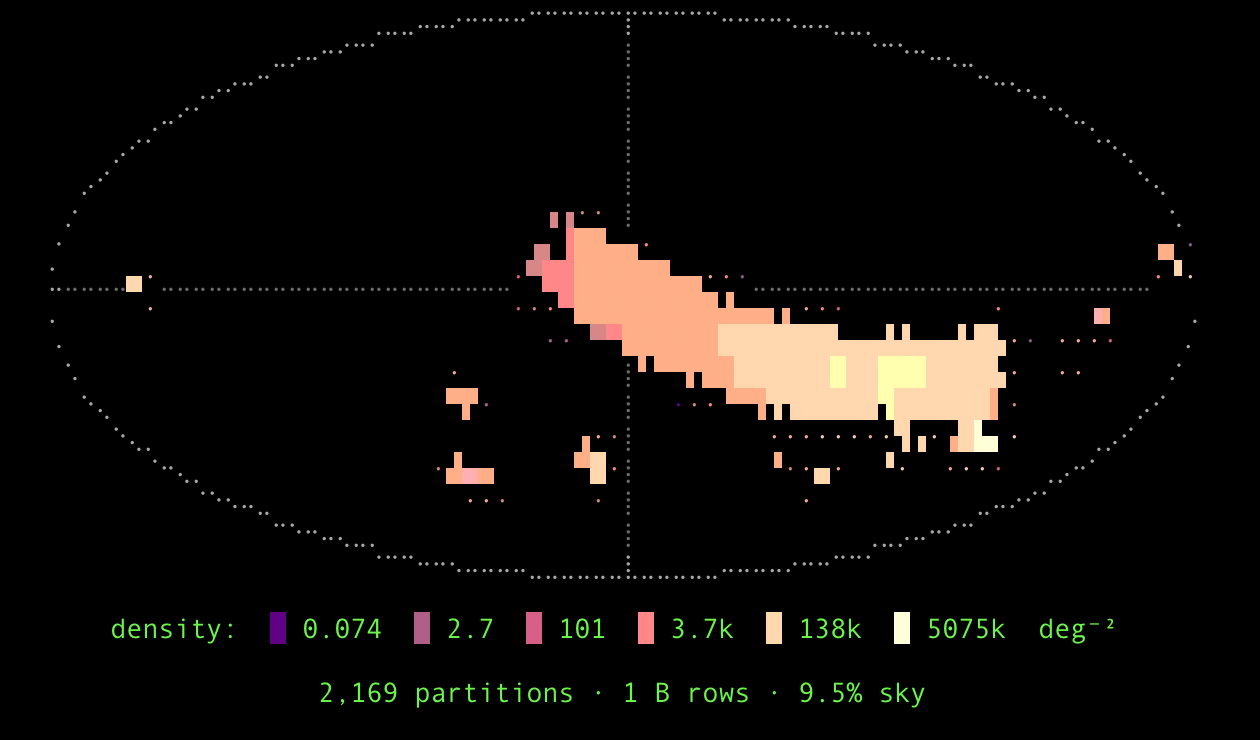
It answers three questions at a glance: did it land where you
expected (RA increases to the left, RA = 0 at the centre, north up —
the all-sky convention), did it complete (holes or a lopsided
footprint stand out), and how big is it — the % sky is the true
covered area at the point_map's native resolution.
The footprint's shape shows coverage area faithfully (a half-covered
cell is drawn half-filled); its colour shows source density, read
off the deg⁻² colorbar. Two knobs tune it (each also settable in
acid.conf or via $ACID_SKYMAP_STYLE / $ACID_SKYMAP_CMAP):
--skymap-style—quadrant(default, area-faithful),blocks(the classic░▒▓█density ramp),braille(finer), oroff.--skymap-cmap—auto(default: detects the terminal background and uses magma on dark, gray on light), an explicitgray/viridis/inferno/magma/plasma, ornonefor monochrome.
The map is drawn only on a terminal — it's omitted when output is piped
or under --progress off.
acid import either completes or fails loudly — it never leaves a
half-written catalog that looks structurally valid (the same guarantee
as acid download).
If a worker hits an error, the import aborts non-zero rather than
silently dropping rows.
The one place rows are dropped — and it's reported
A row whose RA or Dec is null/NaN can't be placed on the sky, so
acid import drops it. This is the only case where the output has
fewer rows than the input, and it is never silent — the importer
prints a count as it reads each file:
If you see no such line, every input row made it into the catalog. (Rows with valid-but-unusual coordinates — say RA = 200° — are kept; only null/NaN are dropped.)
There's no resume: an import is re-run from scratch (re-running over an
existing --out needs --overwrite). To double-check the round-trip,
compare your input total against the catalog's:
import acid

cat = acid.open("my_stars")
print(cat.count())     # input rows, minus any dropped null/NaN-coordinate rows
A complete round-trip¶
Putting it together — write a tiny catalog, import it, and read it back. First a four-row CSV:
csv = """\
source_id,ra,dec,phot_g_mean_mag
1,45.001,1.501,18.2
2,45.002,1.502,19.1
3,45.010,1.495,17.8
4,45.011,1.488,16.7
"""
with open("stars.csv", "w") as f:
    f.write(csv)
Peek at it, then import (a bare --out lands in the catalog library):
Now open it back by name and pull the rows:
import acid

cat = acid.open("demo_stars")
print(cat.count())                       # 4
print(cat.select("source_id, ra, dec, phot_g_mean_mag")
         .sort("phot_g_mean_mag")
         .head()
         .to_astropy())
See also¶
- CLI reference —
acid import— the canonical flag list with defaults. - Catalogs and the registry — how
acidfinds the catalog you imported, andACID_PATH. - Margin caches — what the auto-build produces and how to widen or rebuild one.
- Downloading catalogs — when the catalog you want is already HATS and lives on a mirror.
- Performance & parallelism —
--workers,--ram-budget, and the in-core shuffle.
Appendix: how the out-of-core shuffle works¶
This section is implementation detail for developers and the curious —
you don't need it to use acid import.
When the input is too large for memory, acid import partitions it by
sky pixel in two passes connected by an in-core exchange ring rather
than disk scratch:
- Pass A (shard). Workers read input files in parallel and bin each
row by its HEALPix pixel at the shuffle order (
--order, default 6), building a per-pixel row histogram. Sharded batches are published into a shared anonymous-fd arena — onemmap(MAP_SHARED)region (amemfdwhere available, else an unlinked temp file) handed between processes by file-descriptor passing — so a batch produced by one worker is read by another with no serialization and no disk write. The arena is a ring of blocks with a small struct-of-arrays control plane (free/reserved/live/flushing states); when it fills, the oldest blocks are coalesced and flushed.--reader-workerssizes this pass alone (defaulting to--workers), so a read-bound source can fan out wider here than the write side. - Pass B (merge + write). The histogram drives a partition plan
(
--max-order,--rows-per-partition): contiguous pixels are merged into partitions sized for the row budget, oversized pixels are split deeper. Workers read their assigned pixels' batches back out of the ring (or its spill), concatenate them, sort by_healpix_29, and write one HATS parquet partition each — then the partition metadata,point_map.fits, and (unless--no-margin) the margin cache.
The arena is sized by --ram-budget (default half of available RAM);
only when it can't hold the working set does it spill to --tmpdir.
Keeping the exchange in RAM is the main reason a large import stays I/O-
bound on the input read rather than thrashing scratch storage. The full
design is in the archived
IMPORT-INCORE-EXCHANGE
and IMPORT-CLI
specs and ARCHITECTURE.md §9.